
If your website disappeared from Google after months of steady SEO work, confirm that it is truly missing, then check indexing, crawl access, server health and manual actions before you change any content. I met this problem with a site that ranked well, including its location pages. Our SEO checks found no obvious cause, so the investigation moved to server and WordPress possibilities. This article sets out a diagnostic order, what each check shows and when to bring in developers or hosting support.
What Does It Mean When a Website Disappears from Google?
A website has disappeared from Google when its pages no longer appear in results, even for its own brand name. That differs from a ranking drop, where pages stay indexed but move down. The two problems start in different places, as the table shows.
| What you see | Likely area | First check |
|---|---|---|
| Whole site missing | Indexing, crawl access, server, manual action | Search Console Page indexing report |
| Some pages missing | Page-level noindex or canonical settings | URL Inspection on those pages |
| Pages indexed but ranking lower | Updates, competition, content | Performance report |
Do not rely on one search to confirm the loss. Google says the site: operator does not always return every indexed URL, and it points to URL Inspection for checking a specific page. A site missing from results earns no organic enquiries until Google indexes its pages again, so a fast, ordered diagnosis matters.
What Happened When My Ranked Website Vanished
I had worked on the on-page, off-page and technical SEO of a website. I published blogs every month, built topical authority through content pillars and added location pages that started ranking too.
One day the website was gone from Google’s results. I assumed a temporary bug and waited an hour, then two, then three. Three days later it was still missing.
I checked the site: operator, noindex tags, indexing status, the sitemap, 404 errors and redirects. I also looked at content issues, keyword problems and Google penalties. None of them appeared to explain the loss.
I then spoke with my senior. He recognised the effort I had put in, and he told me the website had faced the same problem since the agency was first established. Two seniors and I reviewed the evidence together and agreed that no obvious SEO issue explained the disappearance. We then turned to server-side problems, developer-related issues and WordPress errors.
This experience taught me that a problem appearing once or twice may be a temporary technical fault that can be found and fixed. If it keeps recurring after a thorough SEO review, do not assume your SEO work caused it. Research properly, check everything within your own expertise and talk to the relevant experts before deciding.
This article does not claim one cause for every case. It records the process.
How to Diagnose a Website That Disappeared from Google
Work from the cheapest, fastest checks to the ones that need other teams. Record the date and result of each step.
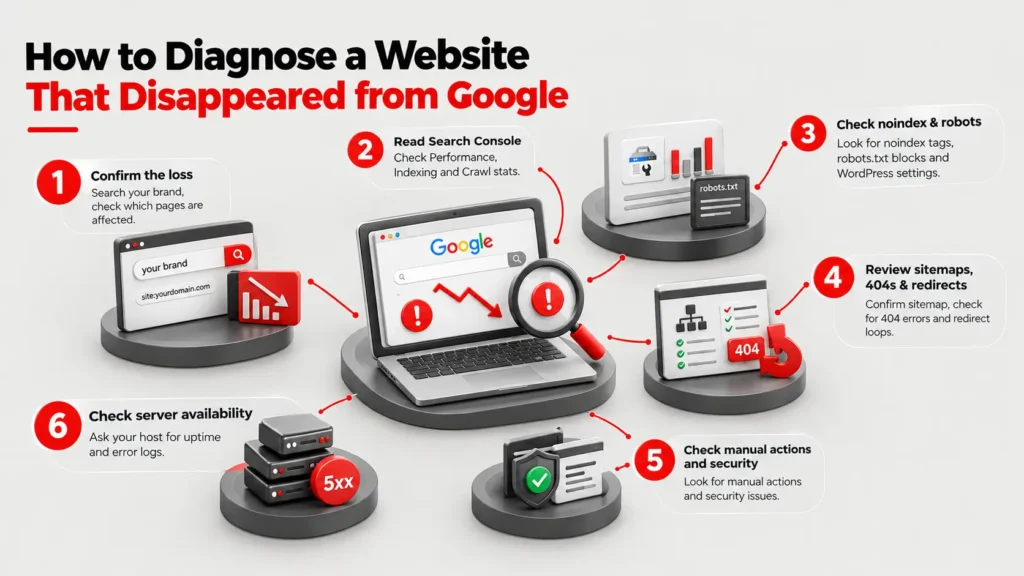
- Confirm the loss. Search your brand name and run a site: query. Note whether only the homepage or every page is affected. Then inspect your homepage with the URL Inspection tool, which reports whether Google has the page and when it last crawled it.
- Read Search Console. Google’s debugging guide starts with the Performance report, then moves to Page indexing and Crawl stats. It notes that a site-wide outage causes a sudden drop, while a misplaced noindex tag usually causes a slower one.
- Look for noindex and robots.txt blocks. A noindex rule can sit in a meta tag or an X-Robots-Tag header, and Google’s noindex documentation says the page is removed after Googlebot recrawls it. In WordPress, also check whether the Reading setting that discourages search engines is switched on.
- Review sitemaps, 404s and redirects. Confirm the sitemap loads, lists the right URLs and that no redirect loop or wrong destination affects key pages. Check the sitemap status in Search Console for read errors, and compare submitted URLs with indexed URLs.
- Check manual actions and security. The Manual Actions report states that a manual action can keep some or all of a site out of results. A green check mark means none exists. Open the Security Issues report as well.
- Check server availability. Ask your host for uptime and error logs for the dates in question. Google’s 5xx guidance says its crawlers slow down after 5xx errors and that URLs persistently returning them are eventually dropped.
What If Every SEO Check Passes?
Then the cause may sit outside SEO. Look at hosting stability, firewall or security rules that block Googlebot, plugin and theme updates, caching and database errors. Each needs access that most SEO tools do not provide. Ask each team a specific question: did the server return errors on these dates, did an update or deployment change any settings, and did a security rule block Googlebot? Google’s debugging guide centres on traffic drops rather than total disappearance, so a complete loss often needs evidence from several teams.
Who Should Investigate, and When to Bring in Others
Start with whoever manages SEO, because the first six checks fall within their tools. Bring in a developer when the evidence points to code, redirects, templates or plugin behaviour, and bring in hosting support when logs show timeouts or server errors.
Escalate early if:
- the problem has happened before
- every SEO check passes
- the whole site disappears at once rather than a few pages
- nobody can explain recent site changes
A technical SEO audit reviews crawlability and indexing, while WordPress development skills help trace plugin, theme and configuration faults. Share dates, screenshots and logs so each expert starts from evidence instead of guesses. Hold any decision to rebuild or migrate the site until that evidence is in.
Mistakes That Slow Recovery
- Rewriting content or swapping keywords before finding the cause
- Assuming a penalty without opening the Manual Actions report
- Making several site changes at once, which hides which one mattered
- Waiting days without opening Search Console
- Treating a repeated problem as a purely SEO fault
- Leaving no record of what was checked and when
Frequently Asked Questions
Why did my website suddenly disappear from Google?
Common causes include a noindex tag, a robots.txt block, persistent server errors, a manual action, a security issue or a site move. Check Search Console for each. If none applies, involve developers and hosting support.
How long does a website take to return to Google results?
No fixed time applies. Google says recrawl timing depends on the page and can take months for some noindex fixes, and that site changes can take days to months to show effects. The cause decides the timeline.
Can a Google penalty remove my entire website?
Yes, a manual action can keep some or all of a site out of results. Open the Manual Actions report. If it shows no actions, a manual penalty is not the cause.
Is the site: operator a reliable way to check indexing?
Not on its own. Google says the list of URLs it returns is not always exhaustive. Use URL Inspection to confirm whether a specific page is on Google.
Can server errors remove pages from Google?
Yes. Google says URLs that persistently return server errors are eventually removed from its index. Short outages usually only slow crawling, so check uptime logs for repeated failures.
Should I rewrite my content when my site disappears?
No. Investigate first. Content changes will not fix a technical cause, and they make later diagnosis harder. Rewrite only after evidence points to content quality.